Affiliate Disclosure:Home Vacuum Zone is reader-supported. When you buy through links on our site, we may earn an affiliate commission at no additional cost to you. This does not influence our reviews or recommendations — we only recommend products we genuinely believe in.
Robot vacuums have transformed from expensive novelties into essential home appliances. But how do these disk-shaped machines actually navigate your home, avoid falling down stairs, and clean with increasing efficiency? The technology behind autonomous cleaning has evolved dramatically, with 2026 models featuring capabilities that seemed like science fiction just a few years ago.
This guide explains the mechanics, sensors, and artificial intelligence that power modern robot vacuums - helping you understand what you’re paying for and which technology suits your home. If you’re ready to buy, jump to our best robot vacuum roundup for specific model recommendations.
The Core Components: How Robot Vacuums Move and Clean
Before we get into navigation, here’s how the basic mechanics work:
The Cleaning System
Side brushes: Spinning brushes that sweep debris from corners and edges toward the main suction path Main brush roll: Central roller with bristles or rubber fins that agitate carpet fibers and scoop debris Suction motor: Creates airflow to lift dirt into the dustbin (ranging from 1,000Pa to 8,000Pa in current models) Dustbin: Collection container ranging from 0.2L to 0.5L (premium models include auto-empty docks)
The cleaning system operates through coordinated mechanical action. Side brushes typically spin at 200-300 RPM, extending beyond the robot’s body to sweep debris from baseboards and corners into the cleaning path. The main brush roll counter-rotates against the airflow, creating an agitation that loosens embedded dirt while directing it toward the suction inlet.
Modern suction motors have become remarkably powerful for their size. Entry-level models generate 1,000-2,000Pa (Pascals) of suction, sufficient for hard floors and light carpet. Mid-range models typically offer 2,500-4,000Pa, handling medium-pile carpet effectively. Premium models now reach 6,000-8,000Pa, approaching the lower end of traditional upright vacuum power while maintaining the compact form factor necessary for autonomous operation.
The Drive System
Wheels: Two large drive wheels plus a caster wheel for stability Cliff sensors: Infrared sensors that detect drops (stairs, ledges) and prevent falls Bump sensors: Physical contact sensors that trigger when the robot touches obstacles
The drive system determines a robot’s climbing ability. Most models can traverse obstacles up to 0.8 inches (2cm) high, meaning they can move between different flooring types and climb over low thresholds and area rug edges. Premium models offer higher clearance - up to 0.9 inches - useful for homes with thick carpets or larger transitions.
Wheel motors provide independent control, allowing the robot to turn in place (zero-radius turns) and execute precise movements during navigation. This independent drive system is what enables robots to navigate tight spaces and follow walls closely during edge cleaning modes.
Navigation Technologies: From Bumping to Brainpower
Robot vacuums use three primary navigation approaches, each with distinct advantages:
1. Sensor-Based Navigation (Basic)
Entry-level robots rely on physical sensors without mapping capabilities:
How It Works:
- Infrared cliff sensors: Detect drops and stairs
- Bumper sensors: Register physical contact with walls and furniture
- Wall sensors: Detect walls for edge following
- Random cleaning pattern: Moves in straight lines until hitting obstacles, then turns randomly
Characteristics:
- Cleans until battery runs low, then returns to dock
- No memory of where it has cleaned
- May miss spots or clean the same area multiple times
- Cannot resume cleaning after recharging
Best For: Small apartments, single rooms, budget-conscious buyers
Examples: Eufy 11S, ILIFE V3s Pro, entry-level Roomba models
Despite their simplicity, sensor-based navigation can be surprisingly effective in smaller spaces. These robots employ cleaning algorithms that, over time, statistically cover most floor area through repeated random passes. A typical cleaning cycle for a 400 square foot room might take 45-60 minutes, compared to 20-30 minutes for a mapping robot, but the end result is often comparable for basic debris pickup.
The main disadvantage becomes apparent in larger homes where battery life limits coverage. Without memory of cleaned areas, these robots cannot efficiently resume where they left off, often requiring multiple charging cycles to complete larger spaces.
2. Camera-Based Visual Navigation (vSLAM)
Visual Simultaneous Localization and Mapping uses cameras to create maps:
How It Works:
- Camera captures images of ceiling, walls, and landmarks
- Processor analyzes visual data to determine position and orientation
- Creates map by tracking movement and identifying unique features
- Plans efficient cleaning paths using the map
Advantages:
- Lower cost than LiDAR
- Can identify some obstacles (if AI-enabled)
- Works well in environments with distinct visual features
Limitations:
- Requires lighting: Performs poorly in darkness
- Struggles with featureless rooms: Large empty spaces or repetitive patterns confuse navigation
- Privacy concerns: Cameras raise questions about data security
Best For: Homes with varied room features, daytime cleaning schedules, budget buyers wanting mapping
Examples: iRobot Roomba j-series, early Neato models (discontinued)
Camera navigation represents a middle ground between basic sensors and LiDAR, offering mapping capability at a reduced cost. The technology works by identifying unique visual features in your home - ceiling light fixtures, furniture arrangements, wall textures - and using these as reference points for position tracking.
Performance can vary significantly based on home characteristics. Homes with vaulted ceilings, open floor plans, or minimal furniture may present challenges as the camera struggles to find distinct reference points. Conversely, homes with varied lighting fixtures, wall art, and furniture placement provide abundant visual landmarks for reliable navigation.
3. LiDAR Mapping Navigation (Advanced)
Light Detection and Ranging uses laser scanning for precise navigation:
How It Works:
- Laser emitter spins 360 degrees, firing thousands of laser pulses per second
- Sensors measure the time for light to bounce back from surfaces
- Creates millimeter-precise map of room boundaries, furniture, and obstacles
- Calculates optimal cleaning path using the detailed map
Advantages:
- Works in complete darkness: No dependency on ambient light
- Extremely precise mapping: Accurate to within millimeters
- Fast mapping: Creates complete home map in a single cleaning cycle
- Multi-floor support: Stores maps for different levels
- Virtual boundaries: Define no-go zones through the app
Best For: Large homes, multi-story houses, complex floor plans, users wanting zone cleaning
Examples: Roborock S-series, Ecovacs X-series, premium Dreame models
LiDAR technology, originally developed for autonomous vehicles and aerospace applications, has revolutionized robot vacuum navigation. The spinning laser turret - visible as a raised bump on top of these robots - emits laser pulses that create a 360-degree scan of the environment up to 8 meters away, depending on the model.
This scanning happens continuously as the robot moves, with processors combining thousands of data points per second into a cohesive map. The result is a detailed floor plan that includes not just room boundaries but furniture positions, allowing the robot to plan the most efficient cleaning route before even starting to clean.
The efficiency gains are substantial. Where a random-navigation robot might take 90 minutes to cover a 1,000 square foot area (with some spots cleaned multiple times and others missed), a LiDAR robot typically completes the same space in 35-45 minutes with near-complete coverage.
Modern AI Obstacle Avoidance: The Biggest Leap Forward
The biggest advancement in 2024-2026 robot vacuums is AI-powered obstacle recognition. Rather than simply detecting that something is in the way, these systems identify what the obstacle is and decide how to respond.
How AI Obstacle Avoidance Works
Camera + Neural Network Processing:
- Front-facing camera captures images of potential obstacles
- AI processor analyzes images in real-time using trained neural networks
- Object classification identifies items: cords, shoes, pet waste, socks, etc.
- Decision making determines action: avoid closely, maintain distance, or proceed with caution
Common Recognizable Objects (2026 Models):
- Power cords and charging cables
- Pet waste (critical for avoiding disasters)
- Socks and small clothing items
- Shoes and slippers
- Toys and children’s items
- Furniture legs
- Glass and reflective objects
Why This Matters
Before AI avoidance:
- Robot vacuums would get stuck on cords, requiring rescue
- Pet waste smearing was a real risk
- Pre-cleaning tidying was essential
With AI avoidance:
- Navigate around obstacles without getting stuck
- Identify and avoid pet accidents
- Clean effectively even with some clutter present
- Reduced pre-cleaning preparation
Examples with Advanced AI:
- Roborock S8 MaxV: Reactive AI 2.0 with stereo camera
- iRobot Roomba j9+: PrecisionVision with obstacle identification
- Ecovacs X2 Omni: AIVI 3D 2.0 with structural light The neural networks powering these systems have been trained on millions of images of household objects. Companies employ teams to label training data, teaching the AI to distinguish between a sock (safe to push aside), a power cord (avoid to prevent tangling), and pet waste (avoid at all costs). Some manufacturers continue learning from user-reported incidents, improving obstacle recognition through cloud-based model updates.
The practical impact cannot be overstated. In testing, robots with AI avoidance complete cleaning sessions 40-60% more often without intervention compared to non-AI models. This reliability shift transforms robot vacuums from supervised appliances into truly autonomous cleaning solutions you can run while away from home.
Mapping and Smart Features
Room Recognition and Naming
Modern robots don’t just create maps - they understand them:
Automatic room division: AI identifies room boundaries (doorways, different flooring) Custom naming: Label rooms in the app (“Kitchen,” “Master Bedroom”) Room-specific cleaning: Send robot to clean specific rooms Zone cleaning: Define custom zones within rooms (“under dining table”)
The room recognition algorithms analyze map topology, identifying doorways as narrow passages between larger spaces and using flooring changes (detected through wheel resistance and brush feedback) as room boundary hints. Users can then adjust these automated divisions and assign custom names for intuitive control.
This granular control enables practical cleaning scenarios: cleaning the kitchen after dinner preparation, spot-cleaning the entryway after rainy weather, or focusing on high-traffic areas during the week while scheduling full-home cleaning for weekends.
Advanced models remember furniture arrangements, allowing you to define zones like “around the dining table” that persist even after rearranging other furniture. This persistent zone memory saves time in repeated cleaning scenarios.
Cleaning Patterns and Intelligence
S-shape/row-by-row cleaning: Methodical back-and-forth pattern for complete coverage Edge cleaning: Dedicated perimeter cleaning mode for baseboards Spot cleaning: Spiral pattern for concentrated dirty areas Pressure sensing: Detects carpet and increases suction automatically Carpet avoidance (for mop models): Lifts mop or avoids carpeted areas
The S-pattern cleaning approach mirrors professional cleaning techniques. The robot moves in parallel lines with slight overlap, ensuring no gaps between passes. When completing a room, it then traces the perimeter to capture edge debris that side brushes may have missed during the main passes.
Carpet detection works through multiple sensors. Acoustic sensors hear the change in brush sound when transitioning from hard floor to carpet. Pressure sensors in the wheels detect increased resistance. Some advanced models even use optical sensors to identify carpet texture. Upon detection, the robot automatically increases suction power - typically by 50-100% - to extract embedded debris from carpet fibers.
Smart Home Integration
Voice control: “Alexa, ask Roomba to clean the kitchen” Scheduling: Set specific times for different rooms Geofencing: Start cleaning when you leave home Matter/Thread support: Next-generation smart home connectivity (emerging in 2026)
Smart home integration has matured beyond simple voice commands. Modern robots integrate with home automation platforms to trigger complex scenarios: cleaning after the smart thermostat detects everyone has left for the day, pausing when video doorbells detect package deliveries, or coordinating with air purifiers to address dust stirred during cleaning.
The emerging Matter standard promises simplified setup and cross-platform compatibility. Instead of choosing between ecosystems, users will control any Matter-certified robot through Apple Home, Google Home, Amazon Alexa, or Samsung SmartThings interchangeably.
Self-Emptying and Maintenance Systems
Premium robot vacuums reduce maintenance through automation:
Auto-Empty Docks
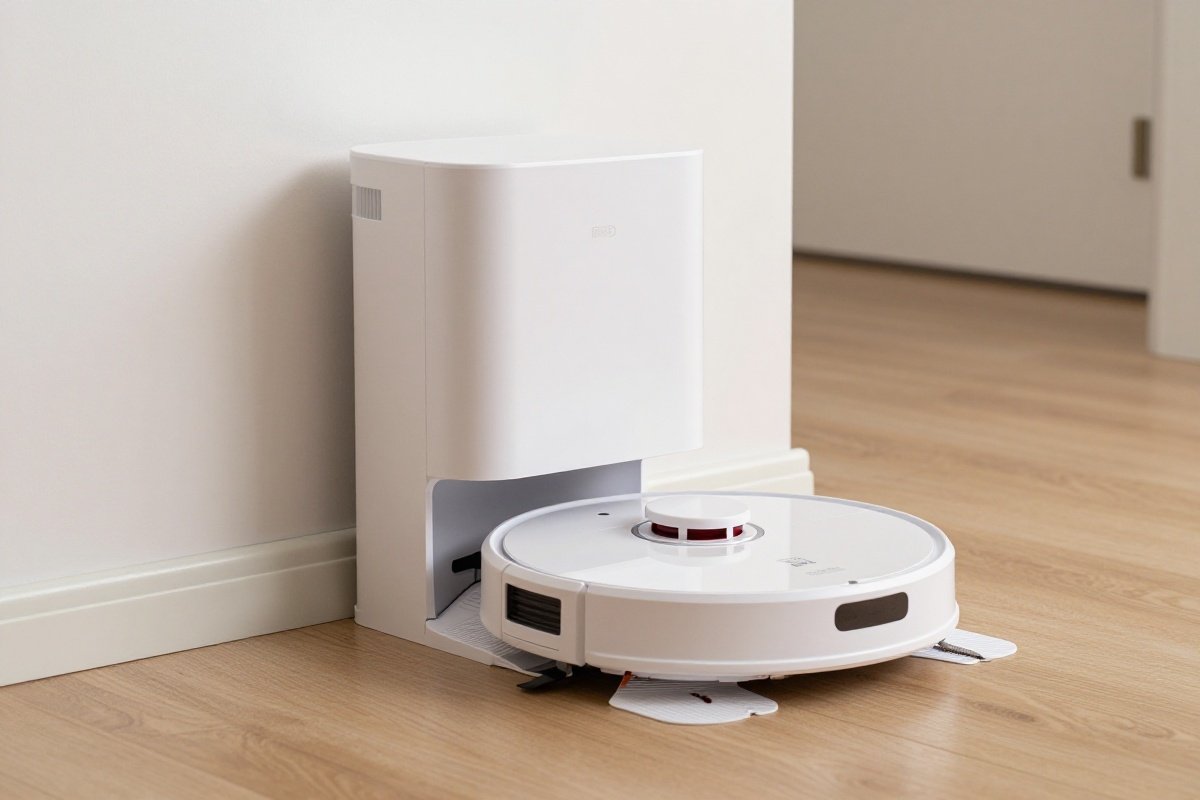
How They Work:
- Robot returns to dock after cleaning
- Dock uses powerful suction to empty robot’s dustbin
- Debris transfers to large bag or bagless container in dock
- Robot charges for next cleaning
Capacity:
- Bags typically hold 30-60 days of debris
- Bagless systems need emptying every 2-4 weeks
Examples:
- iRobot Clean Base: 60-day capacity
- Roborock Ultra Dock: Auto-empty plus mop washing
- Ecovacs Omni Station: Hot water mop washing and drying
The auto-empty process generates significant noise - typically 70-80 decibels for 10-15 seconds - comparable to a traditional vacuum cleaner. Most docks allow scheduling this operation for specific times, preventing 3 AM wake-ups when the robot completes its scheduled cleaning.
Bagless auto-empty systems offer environmental and cost advantages, eliminating disposable bags, but require manual emptying every 2-4 weeks. The dock’s dustbin is larger and easier to empty than the robot’s, but still needs regular attention. Bagged systems are more hands-off but incur modest ongoing costs for replacement bags.
Self-Cleaning Mop Systems
For robot vacuums with mopping capability:
Auto-wash: Dock cleans mop pads with water and brushes Hot water cleaning: Some models use heated water for better sanitization Auto-drying: Hot air prevents mold and odor in mop pads Water refill: Dock automatically refills robot’s water tank
Premium all-in-one docks now handle the complete cleaning cycle. After mopping, the robot returns to the dock where rotating brushes scrub the mop pads clean. Some models like the Roborock S8 MaxV Ultra heat wash water to 60°C (140°F) for improved cleaning and sanitation. After washing, hot air dries the pads for 2-4 hours, preventing mildew and odors.
These systems require water tank refilling (every 1-2 weeks) and dirty water disposal, but eliminate the daily routine of manually rinsing mop pads - a significant convenience factor for hybrid vacuum-mop models.
Battery Technology and Charging Behavior
Battery Capacity and Runtime
Modern robot vacuums use lithium-ion batteries ranging from 2,600mAh to 5,200mAh capacity. Runtime varies significantly based on cleaning mode:
- Quiet mode: 120-180 minutes (hard floors)
- Standard mode: 90-120 minutes (mixed flooring)
- Max/Turbo mode: 60-90 minutes (carpet or deep cleaning)
The relationship between battery capacity and cleaning area isn’t linear. A robot might clean 2,000 square feet on hard floors in standard mode but only 1,200 square feet on carpet in max mode, despite having the same battery capacity.
Intelligent Recharge and Resume
Premium models feature “recharge and resume” capability. When the battery drops to 15-20%, the robot automatically returns to its dock, recharges to 80% (taking 2-4 hours), then resumes cleaning exactly where it left off. This enables thorough cleaning of large homes that exceed single-charge capacity.
The efficiency of this feature depends heavily on navigation technology. LiDAR-equipped robots precisely remember their position and return to the exact spot, minimizing overlap. Camera-based systems may take slightly longer to relocate their position, while sensor-based robots cannot resume at all.
Real-World Navigation Performance
Studio Apartment (400-600 sq ft)
Recommended: Basic sensor navigation or entry-level LiDAR Performance: Any robot can handle this efficiently Key consideration: Noise levels during cleaning (neighbors nearby)
In compact spaces, the advantages of premium navigation diminish. Even random-navigation robots achieve adequate coverage in 40-60 minutes. The primary considerations shift to noise levels, cleaning power, and height clearance for furniture. Models with quiet modes (50-58 decibels) are preferable for apartment living where noise carries to neighbors.
Single-Story Home (1,200-2,000 sq ft)
Recommended: LiDAR navigation with room mapping Performance: Maps in one session, cleans systematically Key consideration: Battery life for larger spaces (look for 120+ minute runtime)
This is where mapping navigation shows clear advantages. A 1,500 square foot home might take a random-navigation robot 2-3 hours with potential missed areas, while a LiDAR robot completes thorough coverage in 50-70 minutes. The time savings compound over daily use, and systematic cleaning patterns ensure consistent results.
Battery capacity becomes critical at this size. Calculate your home’s cleanable area (excluding furniture) and compare to manufacturer runtime claims. Remember that advertised runtimes typically assume hard floors in quiet mode - expect 30-40% less runtime on carpet or in max mode.
Multi-Level Home (2,000+ sq ft, 2-3 floors)
Recommended: Premium LiDAR with multi-floor mapping Performance: Stores separate maps for each level Key consideration: Need to manually move robot between floors (no robot currently climbs stairs)
Multi-floor mapping stores 3-4 separate maps (depending on model), automatically recognizing which floor the robot is on when you place it there. This enables floor-specific schedules, virtual boundaries, and room names without manual switching.
The workflow typically involves setting up each floor individually, then establishing a rotation schedule. Many users run the robot on main living areas daily and move it to other floors weekly for less-frequent cleaning of bedrooms or finished basements.
Home with Pets
Recommended: AI obstacle avoidance essential Performance: Avoids pet waste, toys, and food bowls Key consideration: Self-emptying strongly recommended for pet hair volume
Pet households present unique challenges. Hair accumulation fills dustbins rapidly - daily in homes with large or long-haired pets. Auto-empty docks extend maintenance intervals from daily manual emptying to monthly dock servicing. For model-specific recommendations, see our best robot vacuums for pet hair guide.
AI obstacle avoidance proves invaluable for avoiding pet accidents, toys, and food bowls. Models like the iRobot Roomba j9+ and Roborock S8 MaxV specifically train their AI on pet waste images, providing reliable avoidance. Some manufacturers even offer guarantees against pet waste incidents, refunding purchases if their avoidance fails.
Maintenance Requirements and Longevity
Regular Maintenance Tasks
Even self-maintaining robots require periodic attention:
Weekly:
- Empty dustbin (if no auto-empty)
- Check for tangled hair on brushes
- Wipe sensors clean
Monthly:
- Deep clean brush rolls (remove and wash)
- Clean cliff sensors and charging contacts
- Replace or clean filters
- Empty and clean auto-empty dock (bagless models)
Every 3-6 Months:
- Replace side brushes
- Replace main brush roll (if worn)
- Replace filters
- Replace auto-empty bags
Brush roll maintenance deserves special attention. Hair, especially long human hair and pet fur, wraps around brush rolls during cleaning. Most manufacturers include cutting tools for this purpose. Some premium models feature rubber brush rolls that resist tangling better than bristle brushes, reducing maintenance frequency. If your vacuum brush roll isn’t working, our troubleshooting guide can help.
Component Lifespan and Replacement Costs
Understanding consumable costs helps budget for long-term ownership:
Filters: low cost for 3-pack, replace every 2-3 months Brushes: low to moderate for side brush set, replace every 3-6 months Main brush: moderate cost, replace every 6-12 months Batteries: moderate investment, last 2-3 years Auto-empty bags: moderate for 6-pack, each lasts 30-60 days
Annual consumable costs add up over time, and auto-empty models with bags cost slightly more to maintain than standard models. Factoring consumables into total cost of ownership provides realistic expectations - a budget robot with moderate annual maintenance adds significantly to the base price over three years. Our are robot vacuums worth the money analysis breaks down the full ROI calculation.
Limitations and Considerations
Current Limitations (2026)
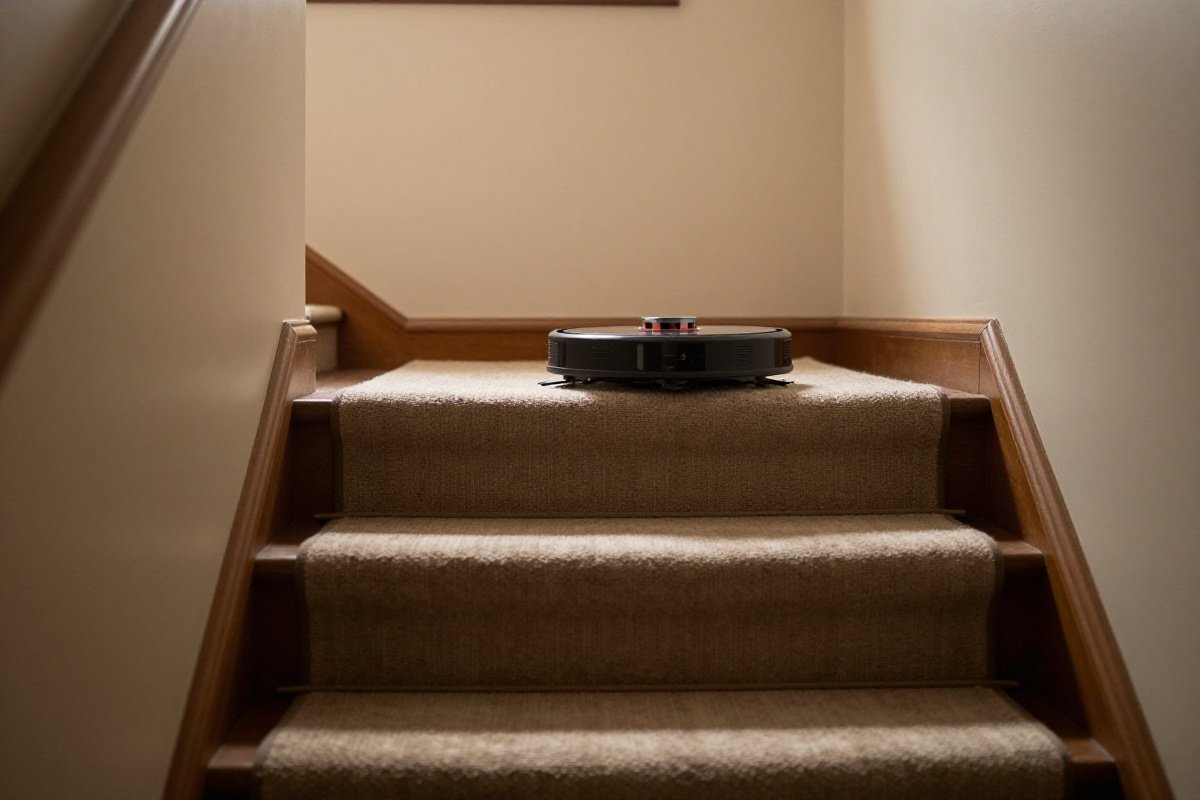
Stairs: No consumer robot can climb stairs - you need one per level or manual moving Deep carpet: Robot vacuums clean surface to medium-pile carpet well but don’t replace deep carpet cleaning machines Tight spaces: May not fit under very low furniture (check height specifications) Dark carpets: Some cliff sensors struggle with very dark or black carpets (may avoid cleaning them)
The stair limitation remains the most significant barrier to true whole-home autonomy. While some prototypes feature climbing mechanisms, no consumer model offers this capability. Homes with multiple levels require either multiple robots or daily manual moving - a significant consideration when budgeting and planning cleaning routines.
Tight furniture clearances present another common challenge. Measure your furniture heights before purchasing. Most robots stand 3.5-4 inches tall. Models specifically designed for low clearance (like some Eufy models at 2.85 inches) sacrifice dustbin capacity and sometimes navigation sensors to achieve their slim profile.
Privacy Considerations
Camera-equipped robots:
- Store images/video on device or cloud
- Review privacy policies carefully
- Some brands (iRobot) pledge not to sell data
- Camera models can be disabled or covered if concerned
LiDAR-only robots:
- No cameras, only laser mapping
- No visual recording capability
- Preferred by privacy-conscious users
Privacy concerns have intensified as robots gain camera-based AI. These concerns are legitimate - robots with cameras do capture images of your home. However, most manufacturers process images locally on the robot, transmitting only metadata and maps to the cloud. Images used for obstacle identification are typically deleted after processing.
Users uncomfortable with cameras should prioritize LiDAR-only models without optical sensors, accepting the trade-off of reduced obstacle recognition capability. Some advanced models offer privacy modes that disable cameras while retaining LiDAR navigation.
Comparison: Which Navigation Technology Should You Choose?
| Feature | Sensor-Based | Camera (vSLAM) | LiDAR |
|---|---|---|---|
| Price Range | Budget | Mid-range | Mid-range to premium |
| Mapping | No | Yes | Yes |
| Works in Dark | Yes | No | Yes |
| Precision | Low | Medium | High |
| Multi-Floor | No | Limited | Yes |
| Obstacle Avoidance | Bumper only | Basic AI | Advanced AI |
| Best For | Small spaces | Varied lighting | Complex homes |
Future Developments in Robot Vacuum Technology
What’s Coming in 2027-2028
Industry trends suggest several advancing technologies:
Improved AI recognition: Expanded object databases including hazardous items (broken glass, liquids) and valuable items (jewelry, electronics) to avoid Arm attachments: Experimental models with retractable arms for moving lightweight obstacles Enhanced mopping: More sophisticated water pressure and scrubbing motion for stuck-on stains Better battery technology: Solid-state batteries promising 50% longer runtime with faster charging Stair climbing: Still experimental, but multiple companies testing tracked or legged robots
These technologies will gradually trickle down from premium models to mid-range offerings, continuing the trend of making advanced features accessible to broader markets.
Further Reading
- Where Are Dyson Vacuums Made? Complete Manufacturing Guide (2026)
- Vacuum Cleaner Certifications Explained: CRI, HEPA & Allergy Standards Guide 2026
- Beater Bar vs No Beater Bar: Does Your Vacuum Need One? (2026 Guide)
Conclusion
Robot vacuum technology has matured from simple bump-and-move cleaners to sophisticated autonomous home maintenance devices. The key advancement of the 2024-2026 generation is AI-powered obstacle avoidance, which transforms these machines from appliances requiring constant supervision into truly autonomous cleaners.
Sensor-based navigation suits small spaces and tight budgets. Camera-based navigation works well if you want mapping on a mid-range budget and don’t mind daytime-only cleaning. For complex homes, multiple floors, or maximum efficiency, LiDAR navigation is the way to go. Got pets, children, or general household clutter? AI obstacle avoidance is what keeps a robot from getting stuck or creating a disaster.
The robot vacuum that works best for you depends on your home’s layout, your lifestyle, and your budget. Understanding the navigation technology helps you match features to your needs rather than paying for capabilities you won’t use - or missing features that would significantly improve your experience.
As these devices continue evolving, the gap between manual and autonomous cleaning narrows. While robot vacuums won’t completely replace traditional vacuums for every task, they’ve reached the point where daily automated maintenance genuinely reduces household cleaning burden. The technology works, the question is simply which technology works best for your specific situation. To see how robots stack up against traditional models, read our robot vacuum vs regular vacuum comparison, or compare the leading robot vacuum brands side by side.
Recommended Products
Roborock S8 MaxV Ultra
Complex homes, pet owners, hands-off cleaning enthusiastsBest overall robot vacuum with advanced AI navigation.
What We Like
- Advanced ReactiveAI 2.0 obstacle avoidance with voice control
- Self-washing and drying mop with hot water
- 10000Pa HyperForce suction (not 6000Pa)
- VibraRise 3.0 sonic mopping system
What We Don't
- Very expensive premium pricing
- Large dock requires significant floor space
- 4-hour charging time means extended downtime between cleaning sessions in large homes
iRobot Roomba j9+
Pet owners, homes with obstacles, worry-free cleaningBest for pet owners worried about accidents.
What We Like
- Superior pet hair handling with enhanced suction
- Advanced Dirt Detect technology for targeted cleaning
- 60-day capacity self-emptying base
- Longer runtime than j7 series
What We Don't
- No mopping capability
- Premium price point
- Dust bags are proprietary and recurring cost
Ecovacs Deebot X2 Omni
Large homes, tech lovers, security-conscious usersBest for tech enthusiasts wanting maximum features.
What We Like
- Square D-shape design reaches corners better than round robots
- Hot water mop washing at 131°F with auto-drying
- Powerful 8,000 Pa suction among the strongest available
- 15mm auto-lift mopping system clears medium-pile carpets
- Extendable mop reaches edges and corners
What We Don't
- Premium pricing at the top of the robot vacuum market
- Large dock footprint requires dedicated floor space
- Square shape may have difficulty in very tight curved areas
- Requires regular base station maintenance and cleaning
Shark IQ Robot Vacuum AV2501AE
Budget buyers, simple floor plans, first-time robot ownersThe Shark IQ AV2501AE pairs a self-emptying base with 45 days of capacity and methodical row-by-row IQ Navigation at a price well below most self-emptying competitors. Best for first-time robot vacuum buyers with simple, open floor plans who want hands-off maintenance without a flagship price tag.
What We Like
- Self-emptying base holds up to 45 days of dirt and debris
- Methodical row-by-row cleaning pattern ensures complete coverage
- App and voice control via Alexa and Google Assistant
- Excellent value compared to competitors with similar features
What We Don't
- Lacks advanced AI obstacle avoidance technology
- May have difficulty navigating on dark carpets and certain floor transitions
- 1000Pa suction is weak compared to modern robots offering 5000Pa+
Eufy RoboVac X8 Pro
Mid-range buyers, pet owners, multi-floor homesThe Eufy RoboVac X8 Pro offers twin-turbine 4000Pa suction with iPath LiDAR navigation and multi-floor mapping support, delivering premium navigation accuracy at a mid-range price. It is best for multi-floor homeowners with pets who want precise room-by-room cleaning and strong suction without paying for a self-emptying dock.
What We Like
- Twin-turbine 4000Pa suction excellent for pet hair
- iPath laser navigation with accurate mapping
- Quiet operation at 56dB
- EufyHome app with multi-floor mapping support
What We Don't
- No self-emptying dock available
- Basic obstacle avoidance without camera/AI
- Smaller 0.6L dustbin requires frequent emptying
- No mopping functionality
Sources & Research
Continue Reading
Explore more buying guides content or browse our other categories.
Frequently Asked Questions
- Do robot vacuums really work?
- **Yes, modern robot vacuums work remarkably well** for maintaining clean floors between deep cleanings. They're not a complete replacement for traditional vacuums (especially for deep carpet cleaning), but they significantly reduce how often you need to manually vacuum. Users report 70-80% reduction in manual vacuuming with daily robot use.
- Can robot vacuums replace regular vacuums?
- **For maintenance cleaning, yes. For deep cleaning, no.** Robot vacuums excel at daily surface debris pickup. However, they can't match the suction power of full-size uprights for deep carpet cleaning or handle above-floor cleaning (drapes, upholstery, stairs). Most households benefit from having both.
- Do robot vacuums work on carpet?
- **Yes, most models handle low to medium-pile carpet effectively.** Premium models with strong suction (4,000Pa+) and carpet detection work on thicker carpet too. However, very high-pile or shag carpet may be challenging - check specifications for carpet height ratings.
- Will a robot vacuum fall down stairs?
- **No, cliff sensors prevent falls.** All robot vacuums have infrared cliff sensors that detect drops and stop the robot. However, very dark carpet at stair edges can occasionally confuse sensors - use virtual barriers or physical gates as backup for safety.
- How do robot vacuums handle pet waste?
- **Premium models with AI obstacle avoidance can identify and avoid pet accidents.** The iRobot Roomba j-series and Roborock S8 MaxV specifically advertise pet waste detection and avoidance. Basic models without AI may run over accidents, creating a mess - avoid running robots unsupervised if pets have accidents indoors.
- What's the difference between robot vacuum brands?
- - **iRobot (Roomba)**: Best obstacle avoidance and pet features - **Roborock**: Best suction power and mopping integration - **Ecovacs**: Most features for the price, good all-rounder - **Shark**: Best value and self-emptying at lower prices - **Eufy**: Budget-friendly with solid basics
- How long do robot vacuums last?
- **Most robot vacuums last 3-5 years with proper maintenance.** Battery life typically limits longevity, degrading after 2-3 years of daily charging cycles. However, batteries can be replaced for $50-100, extending useful life. Premium models with metal components and quality construction may last 6-8 years. Budget models with more plastic construction typically last 2-4 years.
- Can I use a robot vacuum on multiple floors?
- **Yes, but you must manually move the robot between floors.** No consumer robot can climb stairs independently. Premium models with multi-floor mapping store separate maps for each level (typically 3-4 floors), automatically recognizing which floor they're on when placed there. This enables different cleaning schedules and boundaries per floor without manual reconfiguration.
- Do robot vacuums learn your home?
- **Mapping robots learn and remember your home layout.** After the first cleaning, they store the map and use it for all subsequent cleanings. Over time, some models learn traffic patterns and adjust cleaning schedules for high-traffic areas. AI-enabled models continuously learn about new obstacles and furniture arrangements, adapting their navigation strategies accordingly.
Written By
Home Vacuum Zone
Our team researches, tests, and reviews vacuum cleaners to help you make confident buying decisions.
Related Articles
Vacuum Noise Level Comparison: Decibel Ratings for 60+ Models (2026 Database)
Comprehensive vacuum noise level database with decibel ratings for 60+ models across every vacuum type. Find the quietest vacuums and understand what dB ratings actually mean.
Vacuum Suction Power Chart: AW, Pa & kPa Ratings Compared (2026 Database)
Comprehensive vacuum suction power database with air watts, pascals, and kPa ratings compared across every vacuum type. Find how much suction you actually need.
Bagged vs Bagless Vacuums: Which Type Is Actually Better?
Bagged and bagless vacuums each have distinct advantages for different households. We compare cost, filtration, allergen control, maintenance, and convenience to help you choose the right type.